Pixlr AI Photo Editor APK – Smart Editing Tools for Android (2026)
143.09 MBVersion
v3.8.4Requirements
Android 9.0 and aboveDownloads
100 Million+Get it on

Description
Editing photos used to mean dragging sliders for several minutes just to fix one small flaw. With the Pixlr AI Photo Editor APK, that entire process now takes seconds. This app blends a familiar editing layout with genuinely useful AI tools, which makes it a strong option for anyone who wants quick, polished results without learning complicated software.
Trusted by more than 18 million creators worldwide, Pixlr has grown from a simple browser-based editor into a complete mobile photo and video editing app. In this guide, we break down its core features, compare it with other popular editors, and walk you through the safest way to install it on your Android device.
Why Pixlr Has Become a Favourite Among Casual Editors?
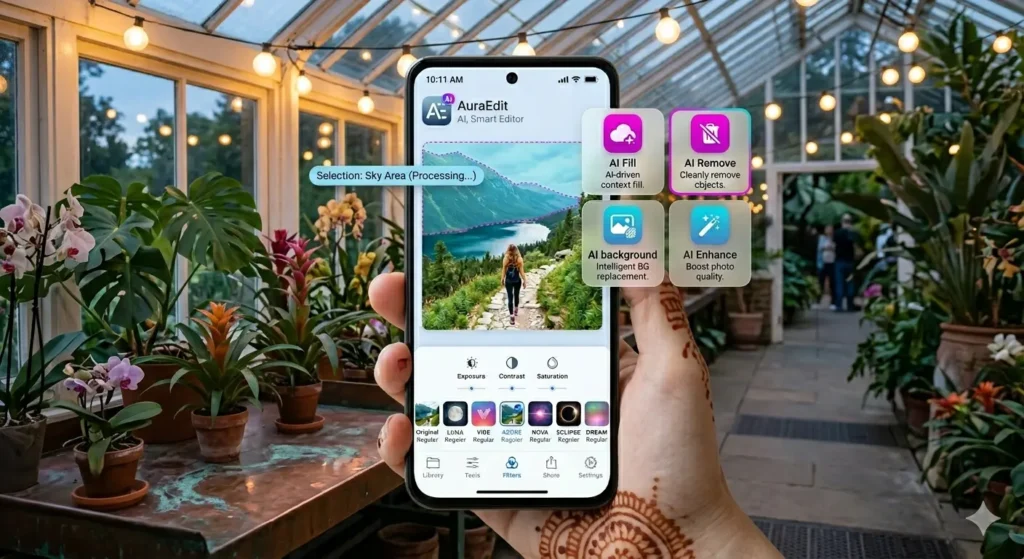
Pixlr AI Photo Editor APK earns its popularity by focusing on speed without sacrificing creative depth. Instead of forcing you to manually mask an object before removing it, the app’s AI handles the heavy lifting in the background. As a result, tasks that once required real editing skill now feel approachable for beginners as well as experienced users.
Moreover, Pixlr keeps adding fresh tools rather than resting on its reputation. The most recent update introduced a redesigned Select Tool with sharper controls, along with the ability to crop videos and image overlays directly inside the app. Consequently, the editor feels just as relevant for short-form video content as it does for static photo editing.
Key Features of Pixlr AI Photo Editor
AI Generative Fill
Highlight any area of your photo, and Pixlr’s AI fills it with new, contextually accurate content. Whether you want to extend a background or add an object that was never in the original shot, this tool handles it convincingly.
AI Remove Object
Unwanted elements such as photobombers, wires, or stray objects disappear with a simple selection. The AI intelligently reconstructs the area behind the removed object, so the final image looks natural rather than patched.
AI Remove Background
Instead of manually tracing around a subject, this tool isolates the foreground automatically. Therefore, swapping backgrounds for product photos or portraits becomes a quick, one-tap process.
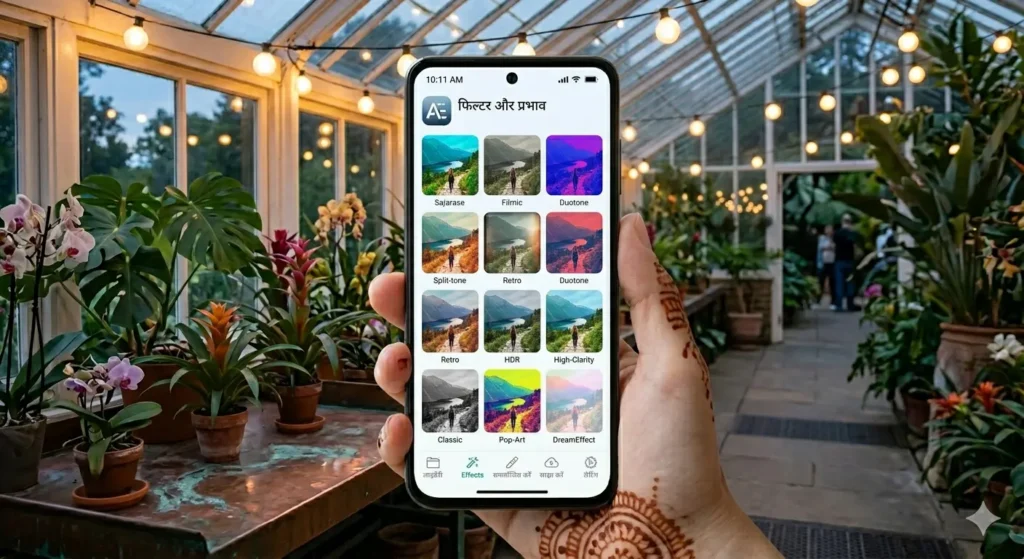
Over 2 Million Effect Combinations
Pixlr offers an enormous library of filters, overlays, and effects that can be mixed and matched. This variety means your edited photos rarely look identical to someone else’s, even when starting from the same base filter.
Double Exposure and Colour Splash
These creative effects let you blend two images together or selectively keep colour in one part of a photo while converting the rest to black and white. Both effects add a distinctive, artistic touch without requiring advanced skills.
Social Media Templates
Multi-layered templates designed specifically for platforms like Instagram, Facebook, and TikTok help you create polished posts without starting from a blank canvas every time.
One-Click Auto Fix
For quick colour and exposure corrections, Auto Fix analyses the image and applies balanced adjustments instantly, which is useful when you simply need a fast improvement rather than a detailed manual edit.
Built-In Video Editor
Beyond photos, Pixlr now includes tools for cropping videos, adding animated stickers, applying filters, and inserting fonts directly into video projects, keeping your editing workflow inside a single app.
PixlrAI Photo Editor APK vs Other Photo Editing Apps
| Feature | Pixlr AI Photo Editor | Typical Competing Apps |
|---|---|---|
| AI Object Removal | Yes, highly accurate | Limited or basic |
| Generative Fill | Yes | Rare in free photo editors |
| Effect Variety | 2 million+ combinations | Usually a fixed filter set |
| Video Editing | Built-in, regularly updated | Often, a separate app is required |
| Social Templates | Multi-layered, platform-specific | Basic or generic templates |
| Ads | Present in free tier | Varies widely |
| Community Size | 18 million+ creators | Varies by app |
Pros and Cons
Pros
- Powerful AI tools that genuinely save editing time
- Massive library of effects and filter combinations
- Built-in video editing alongside photo tools
- Frequent updates with new creative features
- Social media templates streamline content creation
- Works well for both beginners and more experienced editors
Cons
- The free version includes ads, which some users find intrusive
- Export limits apply unless you subscribe to the premium plan
- Heavy reliance on AI features may feel limiting for editors who prefer full manual control
How to Download and Install Pixlr AI Photo Editor APK?
Completing the Pixlr AI Photo Editor APK download takes only a few minutes when you follow these steps in order.
- Tap the download button on this page to get the latest Pixlr APK file.
- Go to your phone’s Settings and enable “Install from Unknown Sources” for your browser or file manager, as this permission is required to install APKs from outside the Play Store.
- Open your Downloads folder, locate the APK file, and tap it to begin installation.
- Tap Install and wait for the process to complete.
- Launch the app, grant the necessary permissions, and start editing your first photo with AI tools.
If you prefer the official route, Pixlr is also available directly on the Google Play Store, where updates install automatically without manual downloads.
Is Pixlr AI Photo Editor APK Safe to Download?
Yes. Pixlr AI Photo Editor APK is developed by Inmagine Lab, an established company behind several widely used creative tools, which adds a layer of trust to the app. Every APK file listed on our site goes through a verification process before publishing, so you can install Pixlr without worrying about hidden malware or unnecessary permissions.
Who Should Use Pixlr AI Photo Editor APK?
Pixlr AI Photo Editor APK suits content creators who need fast turnaround on social media posts, since the combination of templates, filters, and AI tools speeds up the entire creative process. It also works well for everyday users who simply want sharper, more interesting photos without learning complex editing software. Small business owners managing their own product photography particularly benefit from AI Remove Background and AI Remove Object, since these tools replace tasks that would otherwise require separate design software or outside help.
Tips to Get Better Results from Pixlr AI Photo Editor APK
Once you finish the Pixlr AI Photo Editor APK download, a few small habits make a noticeable difference in your final results. Start with a clear, well-lit original photo whenever possible, since AI tools like Generative Fill and Remove Object work more accurately when the surrounding image gives them enough visual context to work with. If a removal looks slightly off on the first attempt, try selecting a slightly larger area around the object rather than tracing it too tightly, as this often gives the AI more room to blend the result naturally.
It also helps to explore the effect library in small batches rather than scrolling through everything at once. Saving a few favourite filters early makes future edits faster, especially if you are creating content regularly for social platforms like Instagram or TikTok. Finally, keep an eye on app updates through the Play Store, since Pixlr rolls out new AI capabilities and editing tools fairly often, and missing an update means missing out on features that could simplify your workflow.
Final Thoughts
Pixlr AI Photo Editor proves that artificial intelligence can genuinely simplify photo editing rather than just adding another buzzword to a feature list. With tools like Generative Fill, Remove Object, and an enormous effect library, it gives users real creative flexibility without demanding technical expertise. Combined with built-in video editing and platform-ready templates, it remains one of the more complete free editing apps available in 2026. If speed and AI-assisted creativity matter to you, the Pixlr AI Photo Editor APK download is well worth adding to your phone today.
Frequently Asked Questions (FAQs)
The core editing tools are free, though the app shows ads and limits some export options unless you subscribe to the premium.
Most AI-powered tools require an internet connection because processing occurs on Pixlr’s cloud servers.
Yes, Pixlr includes a built-in video editor with cropping, filters, fonts, and animation tools.
No, standard exports do not include a watermark in either the free or premium version.
Yes, the AI tools handle most of the technical work, making the app approachable even for users with no editing experience.

APKStick Team
The APKStick Team consists of dedicated Android gaming enthusiasts based in Pakistan who personally test, install, and review every APK before publishing. With years of hands-on experience in mobile gaming and earning apps, we aim to provide safe, verified, and up-to-date APK downloads for Pakistani users. Every app reviewed on APKStick is manually tested on real Android devices to ensure it works, pays, and is free from malware.
Download links
Click the above button to download the game.
Download your game by clicking the button below.