Remini APK Download Free AI Photo Enhancer 2026
185 MBVersion
v3.7.1347Requirements
Android 7.0 and aboveDownloads
600 million+Get it on

Description
Some photos deserve a second chance. A grainy childhood picture, a blurry screenshot, a wedding photo scanned from an old album that never made the jump to digital quality, these images carry memories worth saving. Remini APK exists for this exact rescue mission, using AI to pull sharp, lifelike detail out of photos that years of compression and bad lighting had buried. One tap is all it takes, and what comes out the other side often looks unrecognisable from where it started.
What is Remini APK?
Remini APK is an AI-powered photo and video enhancement app developed by Bending Spoons, designed to fix blurry, pixelated, or low-resolution images. The app reads degraded photo data and reconstructs missing detail using deep learning models trained specifically for face and texture restoration. Unlike basic sharpening filters that just add contrast, Remini rebuilds skin texture, eyes, and fine details that were never visible in the original file. It works on old scanned photographs just as effectively as it does on modern phone screenshots compressed by messaging apps. Since launching in 2019, the app has processed hundreds of millions of images and become a go-to tool whenever a photo simply looks worse than the moment deserved.

The Technology Behind the Magic
Most photo apps brighten or sharpen what already exists. Remini does something fundamentally different, and that difference is worth understanding before you use it. The app runs your image through a neural network trained on millions of high and low-quality photo pairs, teaching it to predict what fine detail probably looked like before compression destroyed it. This is why faces in old photos suddenly show realistic skin texture and sharper eyes instead of just looking less blurry. The trade-off is that results are AI-generated reconstructions, not a perfect recovery of the original pixel data, so occasional artifacts can appear on heavily damaged images. Knowing this helps set the right expectations, especially for irreplaceable family photos where authenticity matters as much as clarity.
Key Features of Remini
Here is what the app puts directly in your hands once it is installed.
- One-tap AI enhancement for blurry or low-resolution photos
- Old photo restoration for scanned or damaged images
- Face enhancement with realistic skin and detail reconstruction
- Video enhancement for low-quality clips
- AI Baby Filter and AI Avatar generation tools
- Batch processing for enhancing multiple photos at once
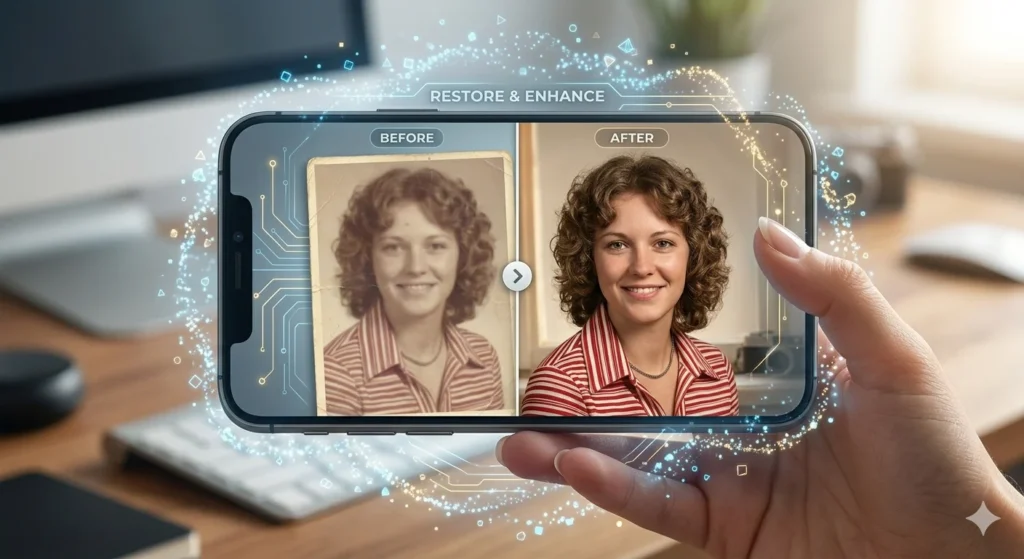
Why Remini Became a Go-To App for Family Photos in Pakistan?
There is a specific moment that drives most downloads of this app, and it usually involves digging through an old phone gallery or a relative’s photo album. Families across Pakistan have started using Remini to restore decades-old wedding pictures, faded Polaroids, and early-2000s camera phone shots before sharing them on social media or printing them for reunions. The app’s ability to handle heavily compressed WhatsApp-forwarded images also makes it useful for recovering photos that have been re-saved and re-shared dozens of times, losing quality with each round trip. For users without access to professional photo restoration services, this app offers a free, instant alternative that used to require a paid studio. That practical, emotional use case explains why the app keeps spreading through word of mouth rather than ads alone.
How to Download and Set Up Remini APK?
The setup takes only a couple of minutes before your first enhanced photo is ready.
- Download the Remini APK file from a trusted source like APKSTICK
- Allow installation from unknown sources if your phone requests permission
- Install the file and open the app to begin setup
- Create a free account or continue as a guest if available
- Grant storage and photo access permissions when prompted
- Upload a photo and tap enhance to see the AI result
The first enhancement usually takes a few seconds longer than later ones, since the app needs to upload and process the image through its cloud servers.
Free Version vs Remini Pro
Knowing the gap between free and paid helps you decide if an upgrade is worth it for your needs.
| Feature | Free Version | Remini Pro |
|---|---|---|
| Photo Enhancement | Yes, limited daily uses | Unlimited |
| Video Enhancement | Limited | Full access |
| Processing Speed | Standard queue | Priority processing |
| Watermark | Sometimes on exports | Removed |
| Ads | Yes | Ad-free |
| Batch Processing | Limited | Expanded |
Remini vs Other AI Enhancer Apps
A side-by-side comparison shows where this app pulls ahead and where it does not.
| Feature | Remini | PicsArt AI Enhance | Fotor |
|---|---|---|---|
| Face Detail Reconstruction | Excellent | Moderate | Moderate |
| Old Photo Restoration | Specialized | Limited | Limited |
| Video Enhancement | Yes | Limited | No |
| Speed | Fast | Moderate | Moderate |
| Free Daily Uses | Limited | Limited | Limited |
| Best For | Restoring old or blurry photos | General editing with AI extras | Quick web-based fixes |
Pros and Cons of Remini
A clear-eyed look at strengths and limitations before you commit to using it regularly.
| Pros | Cons |
|---|---|
| Genuinely impressive results on old photos | Heavily relies on internet connection |
| Specialised face and texture reconstruction | Free plan limits daily enhancements |
| Works on both photos and videos | Subscription pricing feels steep for casual users |
| Simple one-tap workflow | Occasional AI artefacts on extreme restorations |
| Useful for archiving family memories | Cloud processing means photos leave your device |
| Regular updates with new AI tools | Larger app size than basic editors |
Should You Trust Remini With Personal Photos
This question deserves an honest answer rather than a dismissive one. Remini processes images on cloud servers, which means your photo briefly leaves your device during enhancement. For casual photos meant for social sharing or family archiving, this level of exposure matches what most photo apps already require. For deeply personal or sensitive images, including identification documents or anything you would not want stored elsewhere, it makes sense to avoid cloud-based enhancement entirely. Reading the app’s privacy policy before heavy use gives you a clearer picture of how long data is retained and what it gets used for. A few minutes of caution here protects you without giving up the benefit the app actually offers.
Common Problems and Fixes
Most hiccups with this app trace back to connectivity or account limits rather than a flaw in the enhancement engine. If processing gets stuck or takes unusually long, check your internet connection first, since enhancement happens on remote servers rather than on your phone. When you hit a daily limit message, either wait for the reset or consider whether occasional Pro access makes sense for your usage pattern. If results look distorted on heavily damaged photos, try a lower enhancement intensity setting if the app offers one, since extreme restoration pushes the AI model harder. Should the app crash on older phones, clearing its cache and freeing up storage usually resolves the issue. Keeping the app updated also avoids most compatibility problems tied to newer Android versions.
Frequently Asked Questions (FAQs)
Yes, it specialises in restoring detail on old, scanned, or heavily compressed images, though results vary by damage level.
Yes, enhancement happens on cloud servers, so a stable connection is needed for the app to work.
Not exactly, since the AI reconstructs likely detail rather than recovering lost pixel data, so minor artefacts can appear.
Yes, the app includes video enhancement alongside its photo restoration tools.
For casual photos, it is generally safe, though sensitive or private documents are better kept off cloud-based editing tools.

APKStick Team
The APKStick Team consists of dedicated Android gaming enthusiasts based in Pakistan who personally test, install, and review every APK before publishing. With years of hands-on experience in mobile gaming and earning apps, we aim to provide safe, verified, and up-to-date APK downloads for Pakistani users. Every app reviewed on APKStick is manually tested on real Android devices to ensure it works, pays, and is free from malware.
Download links
Click the above button to download the game.
Download your game by clicking the button below.