Description
Finding the best photo editing apps for Android in Pakistan is not as simple as it sounds. Most lists online test these apps on high-end iPhones or flagship Android devices. But the reality in Pakistan is different. Most of us use budget or mid-range Android phones with 4GB to 6GB RAM, and we need apps that run smoothly, stay free, and actually work well on our devices. This guide covers the top photo editing apps tested for real Pakistani users, whether you want to fix a blurry photo, create aesthetic Instagram posts, or enhance portraits for WhatsApp.
What Makes a Good Photo Editing App for Android in Pakistan?
Before jumping into the list, it helps to understand what actually matters for Pakistani users. Three things stand out the most.
First, the app must run well on budget and mid-range phones. An app that heats up your phone or crashes every few minutes is useless, no matter how many features it has. Second, the app should be free or at least offer a strong free version. Paid subscriptions in US dollars do not make sense for most users in Pakistan. Third, the interface should be easy enough that you do not need a YouTube tutorial just to crop a photo.
With that in mind, here are the best photo editing apps for Android in Pakistan right now.
1. Snapseed — Best Free Photo Editor for Android
Snapseed is the best photo editing app for Android in Pakistan, and it is not even close. Google developed this app and keeps it completely free, with no ads, no subscriptions, and no pop-ups asking you to upgrade. Every single tool is available without paying a rupee.
The app runs smoothly on phones with as little as 3GB RAM. Even on budget devices like Tecno or Infinix, Snapseed works without lagging or overheating. That alone puts it ahead of most competitors.
What makes Snapseed truly powerful is its Selective tool. You tap on any part of your photo, a face, a background, a specific object and adjust only that area’s brightness, contrast, or colour. No other free app gives you this level of control. The Healing tool removes pimples, dust spots, and unwanted objects from photos in seconds. The Portrait tool brightens faces, smooths skin, and adds eye clarity without making the result look fake.
For anyone who wants professional-looking edits without spending money, Snapseed is the clear winner. Download the Snapseed APK and start editing today.
2. PicsArt — Best for Creative and Artistic Edits
PicsArt is one of the most popular photo editing apps in Pakistan, especially among younger users who create content for Instagram, TikTok, and WhatsApp statuses. It gives you stickers, AI effects, background removal, text overlays, and hundreds of filters all in one place.
The sticker library in PicsArt is unmatched. If you want to add Urdu text to a photo, put decorative frames on a wedding picture, or create a collage for Eid, PicsArt handles all of it effortlessly. The AI background removal tool also works surprisingly well, even on budget phones.
One honest downside of the free version of PicsArt shows a lot of ads. On slower connections, these ads can make the app feel sluggish. A useful trick: turn off your mobile data or WiFi before opening PicsArt. Without an internet connection, the app cannot load ads and runs noticeably faster. Keep this in mind when you need quick edits.
The Gold subscription removes ads and unlocks extra features, but the free version still gives you enough tools for most everyday edits.
3. Adobe Lightroom Mobile — Best for Serious Photography
Adobe Lightroom Mobile is the go-to app for anyone who takes photography seriously. If you shoot RAW photos or want full control over colours, shadows, highlights, and white balance, Lightroom gives you desktop-grade editing power directly on your Android phone.
The 2026 version of Lightroom added Generative Remove and AI Lens Blur tools. Generative Remove lets you erase unwanted objects or people from your photos and fills in the background realistically. AI Lens Blur creates a professional bokeh effect that blurry background look you see in DSLR photos directly on your phone.
The free version of Lightroom covers most basic editing needs. For advanced RAW editing and cloud sync across devices, a paid Creative Cloud subscription is required. At current dollar rates, the full subscription is expensive for Pakistani users. However, the free tier alone already makes Lightroom one of the most powerful apps on this list.
4. Remini — Best for Fixing Blurry and Old Photos
Remini does one thing better than any other app on this list it fixes blurry, low-quality, and old photos using AI. If you have old family photos that look grainy or unclear, or if a photo came out blurry because of movement or low light, Remini sharpens and enhances them in seconds.
This app is extremely popular in Pakistan for restoring old photos of grandparents or family members. The results are genuinely impressive. A photo that looked completely unusable can come out looking sharp and clear after Remini processes it.
The free version gives you a limited number of enhancements per day. For heavy users, the premium version offers unlimited enhancements. But even with the daily limit, most users find the free version more than enough for occasional photo fixes.
Check out the Remini APK for more details on downloading and using this app.
5. InShot Photo Editor — Best for Quick Edits and Social Media
InShot is best known as a video editing app, but its photo editing tools are just as strong. For quick edits before sharing on WhatsApp, Instagram, or Facebook, InShot is one of the fastest and easiest apps available.
You can crop photos to any social media ratio, apply filters, adjust brightness and contrast, add text, and even blur the background all within a few taps. The interface is clean and straightforward, which makes it perfect for users who do not want to spend time learning a complex app.
InShot works very well even on older budget Android phones. The app does not demand much processing power, and edits quickly without any quality loss.
6. Pixlr — Best for Filters and Quick Artistic Effects
Pixlr sits between Snapseed and PicsArt in terms of what it offers. It has a solid collection of filters, overlays, and artistic effects that let you transform ordinary photos into something more visually interesting without much effort.
The double exposure feature in Pixlr is particularly creative. You can blend two photos to create layered artistic images that look unique. The app also lets you adjust colours, apply film-style presets, and add borders easily.
One limitation to keep in mind — the free version of Pixlr limits you to three saves per day. For casual users who only edit a few photos, this works fine. Heavy users who edit many photos daily will find this limiting and may want to use Snapseed as their primary editor instead.
Get the Pixlr APK here and explore its creative tools for free.
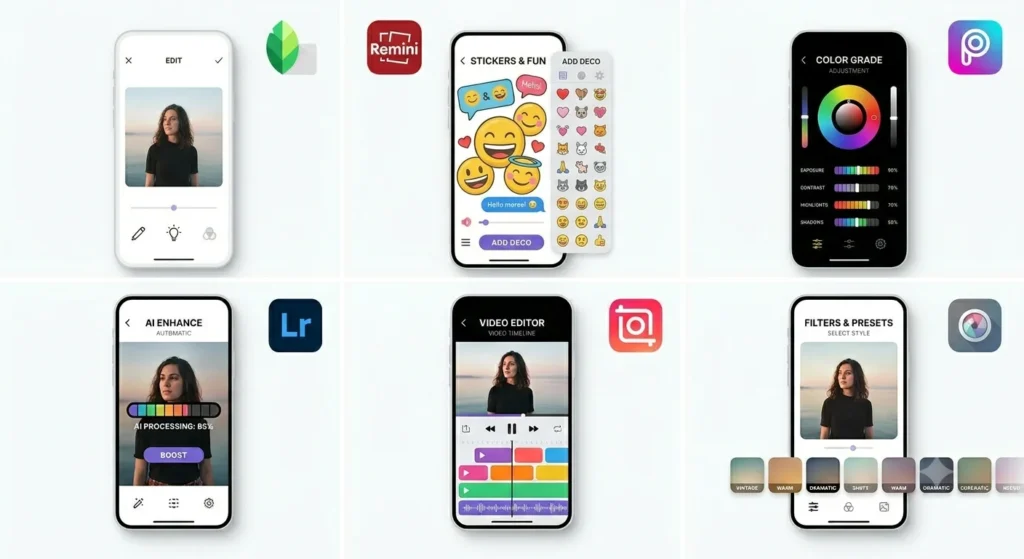
Quick Comparison — Best Photo Editing Apps for Android in Pakistan
| App | Best For | Price | Budget Phone Friendly |
|---|---|---|---|
| Snapseed | All-round editing | 100% Free | Yes |
| PicsArt | Creative and social content | Free with ads | Yes |
| Adobe Lightroom | Professional photography | Free tier + paid | Mid-range and above |
| Remini | Restoring old and blurry photos | Free with limits | Yes |
| InShot | Quick social media edits | Free with ads | Yes |
| Pixlr | Filters and artistic effects | Free with limits | Yes |
Which App Should You Download First?
If you only download one app from this entire list, make it Snapseed. It is completely free, works on every Android phone, has no ads, and gives you professional-level editing tools without any learning curve. It consistently ranks as the best free photo editing app for Android across every major review platform in 2026.
After Snapseed, add PicsArt if you create content for social media. Add Remini if you want to fix old or blurry photos. Add Lightroom only if you are serious about photography and shoot in RAW format.
Tips for Better Photo Editing on Android in Pakistan
A few small habits can make a big difference in your editing results.
Always edit photos in good lighting first, no app can fully fix a photo taken in complete darkness. Use Snapseed’s Selective tool to adjust only problem areas instead of changing the whole photo. When using PicsArt, turn off your data to avoid ads and improve performance. For portrait photos, Remini gives you the best enhancement results compared to any other free app. Always export at the highest quality setting so your photos do not lose detail after editing.
Conclusion
The best photo editing apps for Android in Pakistan cover every need from quick WhatsApp edits to professional photography workflows. Snapseed leads the list for its zero-cost, zero-ad experience that works on every Android device. PicsArt brings creativity and social media tools. Lightroom handles serious photography. Remini fixes what nothing else can. InShot keeps things fast and simple. And Pixlr adds artistic variety.
You do not need to spend money to edit photos like a professional in Pakistan. These apps give you everything you need for free. Download the ones that match your editing style and start creating better photos today.
Frequently Asked Questions
Snapseed is the best free photo editing app for Android. It has no ads, no subscriptions, and works smoothly on all budget and mid-range Android phones in Pakistan.
Yes, PicsArt is free to download and use. The free version includes most tools but shows ads. You can reduce ads by turning off your mobile data before opening the app.
Remini is the best app for fixing blurry and old photos. Its AI engine sharpens low-quality images and restores old family photos with impressive accuracy.
The basic version of Lightroom works on mid-range phones, but advanced RAW editing features run better on phones with 6GB RAM or more.
Yes. PicsArt and InShot are both excellent for Instagram content. They let you crop to the right ratio, add filters, and apply effects that make your posts stand out.
Snapseed uses very little storage and runs light on all devices. It is the best option if your phone has limited internal storage.

APKStick Team
The APKStick Team consists of dedicated Android gaming enthusiasts based in Pakistan who personally test, install, and review every APK before publishing. With years of hands-on experience in mobile gaming and earning apps, we aim to provide safe, verified, and up-to-date APK downloads for Pakistani users. Every app reviewed on APKStick is manually tested on real Android devices to ensure it works, pays, and is free from malware.
Download links
Click the above button to download the game.
Download your game by clicking the button below.