Description
If you want to know how to use a VPN in Pakistan safely, you are not alone. Millions of Pakistanis use VPNs every single day — for privacy, remote work, secure banking on public WiFi, and accessing content that sometimes gets restricted. But not everyone knows how to set one up correctly, which VPN to trust, or what the rules actually are in Pakistan. This guide covers everything in simple steps so you can get started today without any confusion.
What is a VPN and Why Do Pakistanis Use It?
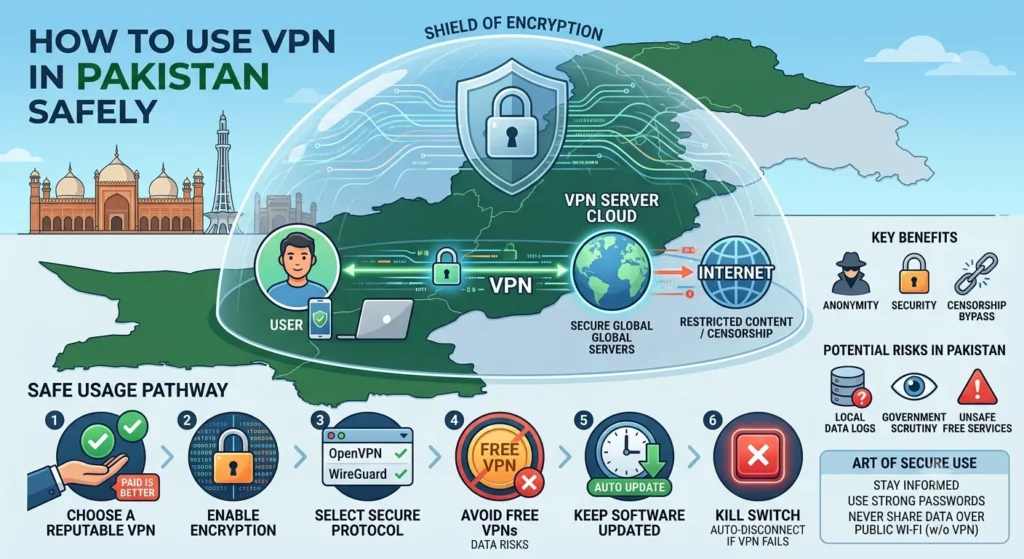
A VPN, or Virtual Private Network, creates an encrypted tunnel between your phone or laptop and the internet. When you connect through a VPN, websites see the VPN server’s IP address instead of yours. Your internet service provider also cannot see what you are browsing.
People in Pakistan use VPNs for several very practical reasons. Remote workers and freelancers use VPNs to connect securely to company networks and international platforms. Students use them to access research tools and global educational content. Many users simply want more privacy when banking or shopping online. Others use VPNs to maintain a secure connection when using public WiFi at cafes, universities, or airports, where anyone on the same network can potentially intercept unprotected traffic.
Is VPN Legal in Pakistan in 2026?
This is the most common question, and the honest answer is: using a VPN for personal and legal activity is generally accepted in Pakistan. Millions of individuals and businesses use VPNs daily without any issues.
However, there are some important points to understand. The Pakistan Telecommunication Authority, known as the PTA, requires commercial and business VPN users, including software houses, freelancers working for international companies, call centres, and banks, to register their VPN usage. For regular personal use, no registration is typically required, but you should always use a VPN for lawful, responsible activity only.
Since late 2024, the PTA has intensified its efforts to block unregistered VPN services. Some VPN apps that worked previously may now struggle to connect on certain ISPs. This is why choosing the right VPN with strong obfuscation technology matters more in 2026 than it did before.
The safest rule to follow: use a VPN for legal activities only, check the latest PTA guidelines if you plan commercial use, and always respect the terms of any websites or services you access through a VPN.
How VPNs Work in Pakistan?
Before you download any VPN app, understanding a few technical realities will save you frustration later.
Pakistan’s ISPs use Deep Packet Inspection, commonly called DPI, to detect and block VPN traffic. This technology identifies the fingerprint of VPN protocols and can throttle or block connections. Standard VPN protocols like PPTP and L2TP are especially vulnerable to this detection. Port 1194, which many VPNs use by default, is blocked by major ISPs, including PTCL and Zong.
The good news is that reliable VPNs have adapted to these restrictions. Look for VPNs that offer obfuscation technology, which disguises VPN traffic to look like normal HTTPS browsing. Connecting through Port 443, the same port used by regular secure websites, also bypasses most ISP blocks because ISPs cannot block it without breaking normal internet access entirely.
Mobile networks in Pakistan tend to block VPNs more aggressively than home WiFi connections due to additional network restrictions. If a VPN works on your home WiFi but fails on Jazz or Zong mobile data, switching to OpenVPN TCP on Port 443 or enabling obfuscation in your VPN app settings usually solves the problem.
How to Use a VPN in Pakistan Safely?
Follow these steps to set up and use a VPN safely on your Android phone in Pakistan.
Choose a Reliable VPN App
This is the most important decision. Avoid free VPNs that do not clearly explain their privacy policy. Many free VPN apps actually log and sell your browsing data, which defeats the entire purpose. Stick with well-known VPN apps that have a verified no-logs policy.
Recommended VPN apps that work well in Pakistan include Proton VPN, which offers a genuinely free tier with no data limits. Psiphon Pro is another strong free option specifically built to work in countries with internet restrictions. Turbo VPN connects quickly and works reliably on Pakistani networks. Windscribe gives you 10GB of free data every month with strong obfuscation support. And 1.1.1.1 WARP from Cloudflare is a lightweight option that improves both privacy and connection speed. You can find APK downloads for all of these on APKStick.
Download and Install the VPN App
Download your chosen VPN from the Google Play Store or from a trusted APK source. After installation, open the app and create a free account if required. Most VPN apps ask for just an email address.
Choose the Right Server
For general privacy and faster speeds, connect to a server in a nearby country. UAE, Turkey, and Singapore servers tend to give good speeds from Pakistan with low latency. If you need to access Pakistan-specific content while abroad, select a Pakistan server from the list.
Avoid connecting to servers that are very far away, like US or European servers, for everyday browsing. Long-distance connections increase latency and slow down your connection noticeably.
Enable Obfuscation or Stealth Mode
Go into your VPN app’s settings and look for options labelled Obfuscation, Stealth Mode, or Scramble. Enable this feature. It disguises your VPN traffic as normal web traffic, which prevents ISPs in Pakistan from detecting and blocking your connection.
If your VPN allows you to choose a protocol, select OpenVPN TCP and set the port to 443. This combination works most reliably on Pakistani networks in 2026.
Enable the Kill Switch
A kill switch automatically disconnects your internet if the VPN connection drops unexpectedly. Without a kill switch, your real IP address briefly becomes visible to websites and your ISP during any connection interruption. Most reliable VPN apps include this feature in settings — always keep it turned on.
Connect and Verify
Tap Connect and wait for the VPN to establish a connection. Once connected, open a browser and search “what is my IP address” to confirm your IP address has changed to the VPN server’s location. If it still shows your real Pakistani IP, the VPN is not working correctly — try switching servers or enabling obfuscation.
Best VPN Apps for Pakistan in 2026
These five VPN apps are available on APKStick and work reliably on Pakistani networks.
Proton VPN stands out as the best free option because it has no data limit on the free tier. Other free VPNs cap your data at 500MB or 1GB per month, which runs out very quickly. Proton VPN is also open source, meaning its code is publicly available for security researchers to verify. The free tier gives you servers in a few countries with no speed throttling. Download the Proton VPN APK from APKStick and get started for free.
Psiphon Pro was built specifically to work in countries where internet restrictions are common. It automatically switches between different connection methods to find one that works on your specific ISP. Pakistani users consistently report that Psiphon Pro connects reliably even when other VPNs fail. It is one of the most trusted free VPN apps in Pakistan. Get the Psiphon Pro APK on APKStick.
Turbo VPN connects fast and keeps things simple. If you want a VPN that works with just one tap and does not ask you to configure anything, Turbo VPN is the easiest option on this list. It works well on both WiFi and mobile data in Pakistan. Download the Turbo VPN APK from APKStick.
Windscribe VPN gives you 10GB of free data per month, which is enough for moderate daily use. It also has strong obfuscation support, making it one of the more reliable options on Pakistani mobile networks where ISPs block VPN traffic aggressively. Get the Windscribe VPN APK on APKStick.
1.1.1.1 WARP from Cloudflare is slightly different from a traditional VPN. It does not change your IP address but it does encrypt your DNS queries and route your traffic through Cloudflare’s fast network. This improves both your privacy and your connection speed noticeably. It is completely free with no data limits. Download the 1.1.1.1 WARP APK from APKStick.
Common VPN Problems in Pakistan and How to Fix Them?
VPN connects, but the internet is very slow
Switch to a closer server location. Try UAE or Turkey instead of US servers. Also, try switching from OpenVPN to WireGuard protocol if your app supports it — WireGuard is generally faster.
VPN keeps disconnecting on mobile data
Enable obfuscation in settings. Switch to OpenVPN TCP on Port 443. Mobile networks like Jazz and Zong apply stricter VPN restrictions than home WiFi, so obfuscation is essential for stable connections on mobile data.
VPN is not connecting at all
Your current VPN server IP may be blocked by your ISP. Switch to a different server in the same country. If that does not work, try a different country server entirely. Some VPN apps also have an automatic server selection option that finds the best working server for your location.
VPN works on WiFi but not on mobile data
This is very common in Pakistan. The fix is usually enabling obfuscation mode or switching to Port 443. Some users also find that changing DNS settings to 1.1.1.1 in their phone’s WiFi settings helps improve connectivity.
Tips to Stay Safe While Using a VPN in Pakistan
Using a VPN is one layer of protection, but a few additional habits make your online experience much safer.
Always keep your VPN kill switch enabled so your real IP never leaks during disconnections. Avoid logging into personal accounts like Google, Facebook, or your bank right after switching VPN servers, as sudden location changes can trigger security alerts on these platforms.
Do not use a VPN to do anything illegal. A VPN protects your privacy from ISPs and websites, but it does not make you anonymous from law enforcement agencies when illegal activity is involved. Always use a VPN responsibly and within the law.
Be careful with completely free VPN apps from unknown developers. Many of them collect and sell your browsing data. Stick with VPNs that have a published no-logs policy and have undergone independent security audits.
Finally, keep your VPN app updated. VPN developers regularly push updates to maintain connectivity against new blocking methods. Outdated VPN apps often lose the ability to connect in countries with active restrictions like Pakistan.
Conclusion
Learning how to use a VPN in Pakistan safely takes less than ten minutes once you know the right steps. Download a trusted VPN app, enable obfuscation, turn on the kill switch, connect to a nearby server, and verify your IP has changed. That is all it takes to start browsing more privately and securely in Pakistan.
For freelancers, remote workers, and students, a good VPN is an essential tool in 2026. For everyday users, even a free VPN like Proton VPN provides meaningful privacy protection at zero cost. Choose the right app, set it up correctly, and use it responsibly.
Frequently Asked Questions (FAQs)
Using a VPN for personal and lawful activity is generally accepted in Pakistan. Commercial and business users should check PTA registration requirements for their specific use case.
Proton VPN, Psiphon Pro, Turbo VPN, Windscribe, and 1.1.1.1 WARP all work reliably on Pakistani networks. Proton VPN is the best free option with no data limit.
Mobile networks in Pakistan apply stricter VPN restrictions. Enable obfuscation mode in your VPN settings and switch to OpenVPN TCP on Port 443 to fix this.
Proton VPN is the best free VPN with no data cap. It is also open source and has a verified no-logs policy.
Yes, all VPNs add some latency. Connecting to a nearby server like the UAE or Turkey minimises speed loss. WireGuard protocol also gives faster speeds than OpenVPN on most connections.
Obfuscation disguises VPN traffic to look like normal web traffic. In Pakistan, where ISPs use Deep Packet Inspection to detect VPNs, enabling obfuscation is strongly recommended for reliable connections.

APKStick Team
The APKStick Team consists of dedicated Android gaming enthusiasts based in Pakistan who personally test, install, and review every APK before publishing. With years of hands-on experience in mobile gaming and earning apps, we aim to provide safe, verified, and up-to-date APK downloads for Pakistani users. Every app reviewed on APKStick is manually tested on real Android devices to ensure it works, pays, and is free from malware.
Download links
Click the above button to download the game.
Download your game by clicking the button below.