Windscribe VPN APK Download Free for Android
43 MBVersion
v4.0.2218Requirements
Android 5.0 and aboveDownloads
40 Million+Get it on

Description
Finding a free VPN that actually delivers on its promises is harder than it sounds. Most free VPN apps either throttle your speed after a few minutes or hand your data over to advertisers without telling you. Windscribe VPN APK does neither of those things. Developed by a Canadian company and trusted by over 40 million users worldwide, Windscribe gives every free user 10GB of data every single month without asking for a credit card. Beyond the generous data limit, it brings strong encryption, built-in ad blocking, tracker protection, and support for 69 plus countries into one lightweight Android app. Whether you browse casually, stream content, or need a reliable way to bypass blocked websites in Pakistan, Windscribe VPN APK free download gives you more than most paid VPNs offer for absolutely nothing.
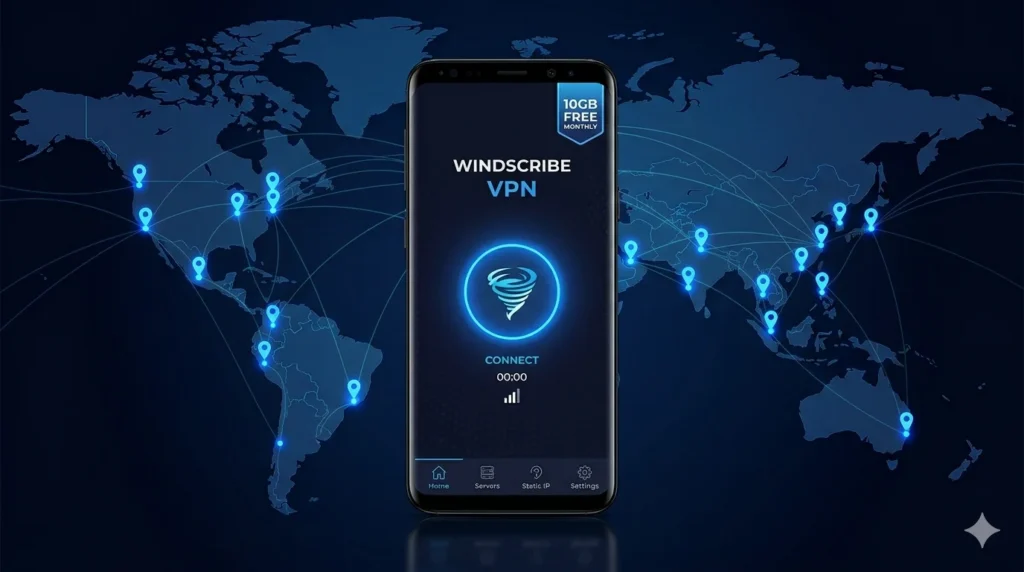
What Is Windscribe VPN?
Windscribe is a privacy-focused VPN service built by Windscribe Limited, an independently owned company based in Canada. Unlike most VPN providers that answer to investors or parent corporations, Windscribe operates privately with no outside funding. That independence matters because it means the company makes decisions based on user privacy rather than advertiser demands.
Since its launch in 2016, Windscribe has grown to serve millions of users across the globe. The Android app alone has crossed 40 million total downloads and consistently holds a 4.6 out of 5 rating on Google Play based on over 260,000 user reviews. The app is also open-source and independently audited, which means security researchers can verify exactly how it handles your data.
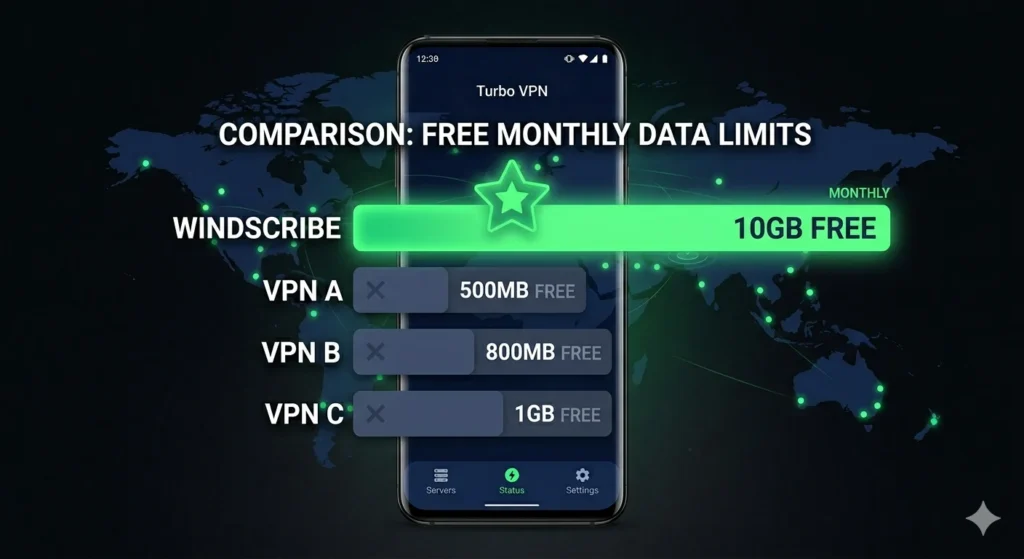
What really sets Windscribe apart from every other free VPN on this list is simple: it gives you 10GB of free data every month with no credit card required. That alone makes it one of the most generous free VPN apps for Android available today.
Windscribe VPN APK App Info
| Detail | Info |
|---|---|
| App Name | Windscribe: Fast and Secure VPN |
| Developer | Windscribe Limited |
| Official Website | https://windscribe.com |
| Play Store URL | https://play.google.com/store/apps/details?id=com.windscribe.vpn |
| Total Downloads | 40 Million+ |
| Play Store Rating | 4.8 out of 5 (260K+ ratings) |
| Android Required | Android 5.0 and above |
| App Size | 43 MB |
| Root Required | No |
| Account Required | Optional (no email needed) |
| Latest Version | 4.0.2218 |
| Price | Free (Pro plan available) |
| Headquarters | Canada |
| Founded | 2016 |
Why Windscribe VPN Stands Out From Other Free VPNs
Before going into individual features, it helps to understand why Windscribe earns a different kind of trust compared to apps like Turbo VPN or basic proxy tools.
Most free VPN apps make money by showing ads or selling user data to third parties. Windscribe takes a different approach entirely. The company earns revenue through its paid Pro plan and uses a portion of that to fund the free tier. As a result, free users get a genuinely private experience without becoming the product.
On top of that, Windscribe’s no-logs policy has been tested in the real world. When law enforcement authorities once requested user data from Windscribe, the company had nothing to hand over because it genuinely stores no logs. That kind of court-tested privacy protection is extremely rare among free VPN providers and puts Windscribe in a completely different category.
Key Features of Windscribe VPN APK for Android
10GB Free Data Every Month
Windscribe gives every free user 10GB of monthly data with absolutely no credit card required. You can get started by simply creating an account with no email address needed. For comparison, most competing free VPNs cap you at 500MB to 2GB per month. The 10GB allowance covers weeks of regular browsing, several hours of video streaming, and plenty of daily use for the average Android user in Pakistan.
High-Speed 10 Gbps Servers
Windscribe runs its servers on high-speed 10 Gbps connections to ensure fast downloads, smooth video streaming, and low-latency gaming. Furthermore, in 2022 the company upgraded all its servers to run entirely on diskless RAM-based hardware. This means no data ever gets written to physical storage on the server, which dramatically reduces the risk of data leaks even if a server gets seized.
Servers in 69 Plus Countries
Free users get access to servers in 10 countries, while Pro users unlock all locations across 69 plus countries. The free server list includes Canada, the United States, Germany, France, Romania, the Netherlands, Switzerland, Turkey, Hong Kong, and Norway, with enough variety to unblock the most popular content and bypass regional restrictions from Pakistan.
Built-In Ad Blocker and Tracker Protection
Windscribe includes a built-in feature called R.O.B.E.R.T. that blocks ads, malicious websites, trackers, and crypto-mining scripts at the DNS level. As a result, pages load faster, your bandwidth stays preserved, and advertisers lose the ability to follow you across the internet. This feature works automatically the moment you connect to the VPN without any additional configuration.
Six VPN Protocols to Choose From
Windscribe gives you more protocol flexibility than almost any other free VPN on Android. You can connect using WireGuard for the fastest speeds, IKEv2 for quick connection times, OpenVPN over TCP for restrictive networks, OpenVPN over UDP for the traditional standard, and Stealth mode for networks that actively block VPN traffic. For users in Pakistan where ISPs sometimes throttle or block VPN connections, the Stealth protocol makes a real difference.
Firewall Kill Switch
If your VPN connection drops unexpectedly, the built-in firewall kill switch immediately cuts all internet traffic. This prevents your real IP address from ever leaking to websites or apps you have open. Unlike some VPNs that only offer a software-level kill switch, Windscribe’s firewall operates at the system level for stronger protection.
Split Tunneling
Split tunnelling lets you choose which apps on your phone use the VPN and which ones connect directly to the internet. For example, you can route your browser through Windscribe while your banking app or local streaming service connects normally. This saves bandwidth and prevents compatibility issues with apps that do not work well through VPN connections.
No Logs Policy Proven in Court
Windscribe’s no-logs policy is not just a marketing promise. When authorities requested user data from the company, Windscribe had nothing to provide because it genuinely keeps no activity logs. This real-world legal test gives users a level of confidence that most VPN providers cannot match regardless of what their privacy policy says.
Open Source and Independently Audited
Windscribe publishes its Android app as open source code that anyone can inspect. Additionally, the company commissions independent security audits to verify that its privacy claims hold up under technical scrutiny. For users who take privacy seriously, open-source transparency removes the need to simply trust the company’s word.
Automatic Connection Rules
Windscribe lets you set rules that tell the app when to connect automatically. For instance, you can configure it to turn on the VPN whenever it detects an unknown WiFi network and turn it off when it reconnects to your trusted home WiFi. This hands-free approach keeps you protected on public networks without requiring you to remember to tap the connect button manually.
Streaming Support on Pro Plan
Pro users get optimized servers that unblock Netflix, Disney Plus, Amazon Prime Video, Hulu, HBO Max, BBC iPlayer, DAZN, and a dozen other major streaming platforms. Free users can still access some streaming content depending on the server they choose, though streaming performance varies by location and time of day.
Works Across All Your Devices
A single Windscribe account works on Android, iOS, Windows, macOS, Linux, Chrome, Firefox, and even smart TVs and routers. While the free plan does not cap simultaneous connections on the same device, the Pro plan removes all device limits entirely so every device you own stays protected under one account.
Windscribe VPN Free vs Pro: Full Comparison
| Feature | Free Plan | Pro Plan |
|---|---|---|
| Price | Free | From $4.08/month |
| Monthly Data | 10GB | Unlimited |
| Server Countries | 10 Countries | 69 Plus Countries |
| VPN Protocols | All 6 | All 6 |
| Ad and Tracker Blocking | Yes | Yes |
| Kill Switch | Yes | Yes |
| Split Tunneling | Yes | Yes |
| Streaming Servers | Limited | Full Access |
| Static IP Options | No | Yes |
| Build Your Own Plan | No | Yes |
| Account Required | Optional | Yes |
| Credit Card Required | No | Yes |
The free plan covers everything most Android users in Pakistan need for daily browsing, privacy protection, and bypassing blocked websites. Moving to Pro makes sense for heavy streamers, frequent travelers, and users who need servers in specific countries not available on the free tier.
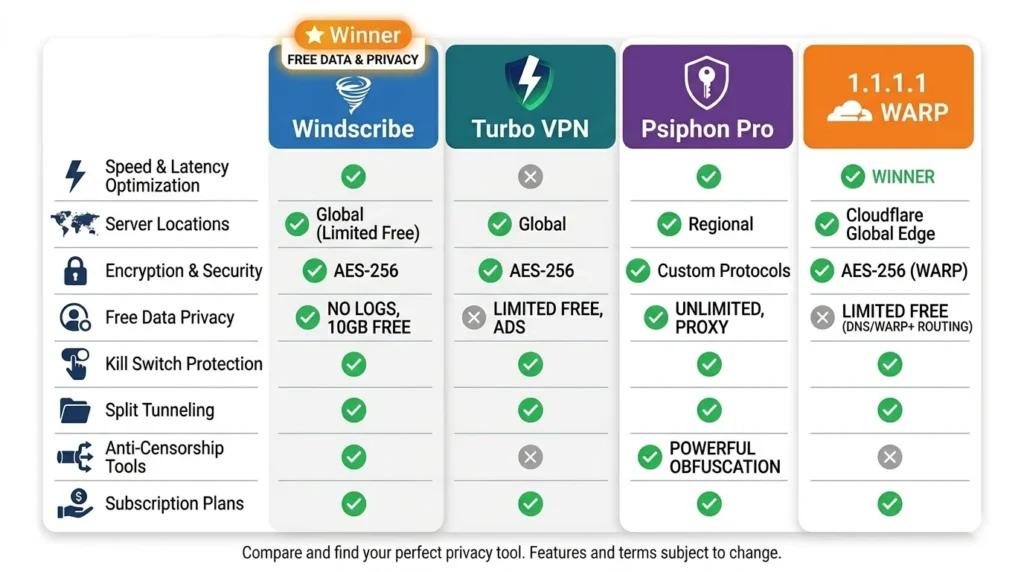
Windscribe VPN vs Turbo VPN vs Psiphon Pro vs 1.1.1.1 WARP
By now, you have seen three other VPN and privacy tools reviewed on this site. Here is how Windscribe compares with all of them so you can choose the right tool for your specific needs.
| Feature | Windscribe VPN | Turbo VPN | Psiphon Pro | 1.1.1.1 WARP |
|---|---|---|---|---|
| Free Data Limit | 10GB/month | Unlimited (ads) | Unlimited (ads) | Unlimited |
| Server Countries (Free) | 10 | Limited | Limited | No selection |
| Ad Blocking | Yes | No | No | Yes |
| Open Source | Yes | No | Yes | Partial |
| No Logs Proven in Court | Yes | No | No | No |
| Kill Switch | Yes | Yes | No | Partial |
| Split Tunneling | Yes | Yes (Premium) | Yes | Yes (Premium) |
| Protocols Available | 6 | Limited | Multi-protocol | WireGuard/MASQUE |
| Changes IP Location | Yes | Yes | Yes | No |
| Streaming Support | Yes (Pro) | Limited | No | No |
| Developer Location | Canada | Singapore | Canada | United States |
| Best For | Privacy + browsing | Speed + unblocking | Censorship bypass | DNS privacy |
Is Windscribe VPN Safe to Use on Android?
Windscribe is one of the safest free VPN apps you can install on Android and that is not an exaggerated claim. Several factors make it genuinely trustworthy rather than just appearing trustworthy on paper.
First, the company operates out of Canada which has strong privacy laws and sits outside the jurisdiction of major intelligence-sharing alliances like the Five Eyes, Nine Eyes, and Fourteen Eyes in terms of not being legally compelled to install backdoors into their service.
Second, the open-source codebase means independent security researchers can and do review how the app handles your data. Several independent audits have confirmed that the app behaves as advertised.
Third, and most importantly, the no-logs policy held up in a real legal case. When authorities demanded user data, Windscribe had nothing to hand over because the logs simply did not exist. No other free VPN on this list can make that same claim with a real legal precedent behind it.
For sensitive tasks like online banking, it is still best practice to use a trusted connection regardless of which VPN you use. However, for everyday browsing, streaming, and bypassing blocked websites in Pakistan, Windscribe is as safe as free VPNs get.
How to Download Windscribe VPN APK Free for Android?
You have two easy ways to download Windscribe VPN on your Android device.
Method 1: Google Play Store (Official)
Open the Play Store on your Android phone, search for Windscribe VPN, and tap Install. This method gives you the official verified version along with automatic updates whenever a new version is released.
Method 2: Direct APK Download
If you want the APK file directly or prefer the MOD version with Pro features unlocked, follow these steps:
- Open your browser and visit apkstick.pk
- Search for Windscribe VPN APK in the search bar
- Open the app page and tap the Download button
- Wait for the APK file to finish downloading to your phone
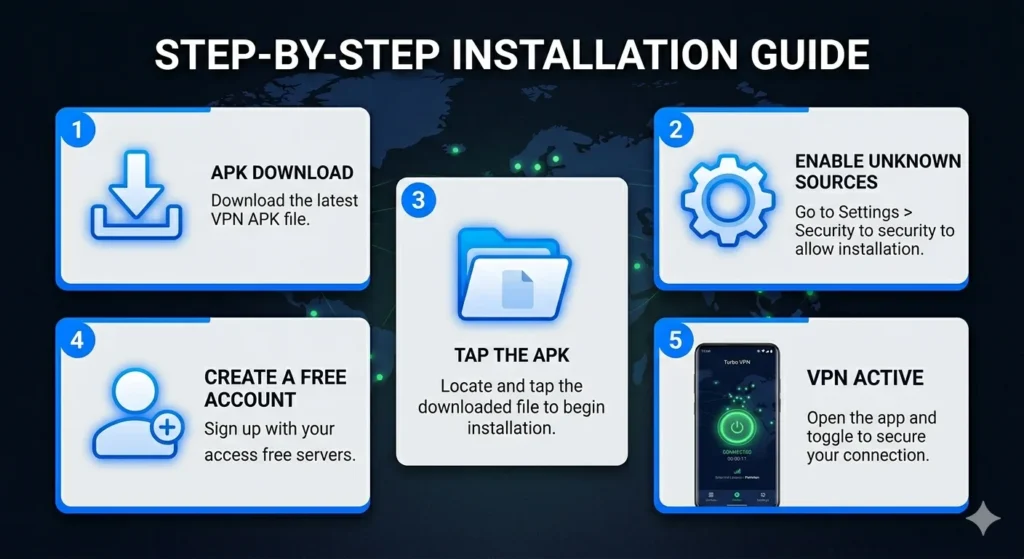
- Open Settings on your Android device and go to Security or Privacy
- Enable the Install from Unknown Sources option
- Open your file manager and go to the Downloads folder
- Tap the Windscribe APK file to begin installation
How to Install Windscribe VPN APK on Android?
After downloading the APK file, installation takes less than two minutes.
Step 1: Open your file manager and go to the Downloads folder. Look for the Windscribe VPN APK file you just downloaded.
Step 2: Tap the file to open the installation prompt. If your phone asks for permission to install from unknown sources, grant it in your settings and return to this step.
Step 3: Tap the Install button on the installation screen and wait for the progress bar to complete. This usually takes around 15 to 20 seconds.
Step 4: Once installation finishes, tap Open to launch the app directly.
Step 5: On the welcome screen, tap Get Started to create a free account. Importantly, you do not need an email address to sign up. You can also log in if you already have an account.
Step 6: After logging in, tap the Quick Connect button at the top of the screen. The app automatically connects you to the best available server for your location. Once the button turns green and shows Connected, you are browsing privately and securely.
How to Get More Than 10GB Free Data on Windscribe?
Most users do not know that Windscribe lets you earn additional free data beyond the standard 10GB monthly allowance.
Confirming your email address when you sign up adds an extra 10GB to your monthly limit, bringing your total free allocation to 10GB per month from the start. Additionally, Windscribe periodically offers bonus data through its social channels and promotional campaigns. Keeping an eye on the official Windscribe Twitter or Reddit page can help you catch these offers when they appear.
How to Use Windscribe VPN to Bypass Blocked Websites in Pakistan?
Using Windscribe to access blocked websites in Pakistan takes less than a minute from start to finish.
Step 1: Open the Windscribe app and make sure you are logged in.
Step 2: Tap the server list icon and choose a server from the available free locations. Germany, the Netherlands, or Romania work well for general content access.
Step 3: Tap Connect or use the Quick Connect button to let the app choose automatically.
Step 4: Once the app shows Connected, open your browser and visit any previously blocked website.
The VPN assigns you an IP address from the country you selected so the website sees you as a visitor from that country rather than Pakistan. As a result, geo-blocks and ISP filters no longer apply.
System Requirements for Windscribe VPN APK
| Requirement | Details |
|---|---|
| Android Version | 5.0 and above |
| App Size | 43 MB |
| Internet Connection | Required |
| Root Access | Not required |
| Account Required | Optional |
| Storage Space | 80 MB free minimum |
| RAM | 1 GB minimum recommended |
Windscribe VPN Build Your Own Plan: A Unique Paid Option
One feature that makes Windscribe’s paid offering different from every other VPN is the Build Your Own Plan option. Instead of paying for all 69 countries when you only need three or four, Windscribe lets you purchase only the specific server locations you want at a much lower price. This makes the paid plan genuinely flexible for users who want unlimited data in specific regions without paying for server access they will never use.
Conclusion
Windscribe VPN APK earns its reputation as the most generous free VPN for Android by delivering things that most paid VPNs struggle to match. The 10GB monthly free data allowance beats every competitor in the free VPN space. The court-tested no-logs policy gives you real privacy rather than a marketing promise. The open-source codebase and independent audits back up every privacy claim the company makes. Add to this the built-in ad blocker, six protocol options, a system-level kill switch, and servers in 10 countries on the free plan, and you have a VPN that genuinely punches above its weight at zero cost.
Whether you use it for daily private browsing, accessing blocked websites in Pakistan, protecting yourself on public WiFi, or streaming content from international platforms, Windscribe VPN APK covers every use case without asking you to spend a single rupee on day one.
Frequently Asked Questions (FAQs)
Yes, Windscribe supports router-level installation, which means every device connected to your home WiFi gets VPN protection automatically without installing the app on each device separately.
Speed varies by server and network but on nearby servers, most users report minimal slowdown. Connecting to a closer server like Turkey or Germany from Pakistan gives you noticeably better speeds than connecting to a US server.
Free users can access some region-locked YouTube content through the available free servers. Netflix unblocking works best on the Pro plan with streaming-optimised servers since Netflix actively blocks many VPN IP addresses
Yes, and it is actually one of the best use cases for it. Connecting to Windscribe on a public WiFi hotspot encrypts all your traffic and prevents anyone on the same network from snooping on your activity.
Once your monthly free data runs out, the VPN stops routing traffic through its servers until your allowance resets at the start of the next month. You can upgrade to Pro at any time to get unlimited data immediately.
You can use it for gaming but VPNs generally add some latency depending on server distance. For gaming, connecting to the nearest available server, like Turkey or Germany, reduces that latency as much as possible.
Yes, Windscribe has an Android TV app that works on Android TV devices and Amazon Fire Stick. You can install it from the Play Store on supported devices.

APKStick Team
The APKStick Team consists of dedicated Android gaming enthusiasts based in Pakistan who personally test, install, and review every APK before publishing. With years of hands-on experience in mobile gaming and earning apps, we aim to provide safe, verified, and up-to-date APK downloads for Pakistani users. Every app reviewed on APKStick is manually tested on real Android devices to ensure it works, pays, and is free from malware.
Download links
Click the above button to download the game.
Download your game by clicking the button below.