Download 1.1.1.1 WARP APK Free for Android (2026)
14 MBVersion
v6.38.7Requirements
Android 7.0 and aboveDownloads
50 Million+Get it on

Description
Most people spend years using a slow internet connection without ever realising that their phone’s default DNS settings are quietly holding them back. The 1.1.1.1 WARP APK by Cloudflare fixes that problem in one tap. It replaces your ISP’s default DNS with the world’s fastest and most private DNS resolver and then goes a step further by encrypting all your internet traffic through WARP technology. The result is a faster, safer, and more private browsing experience that costs you absolutely nothing. Cloudflare launched this app in 2018 and it has reached 50 million-plus downloads on the Google Play Store since then, making it one of the most trusted privacy tools on Android.

What Is the 1.1.1.1 WARP App?
The 1.1.1.1 app is a free internet privacy and speed tool developed by Cloudflare Inc., one of the world’s largest internet infrastructure companies. The app combines two powerful technologies in a single lightweight package.
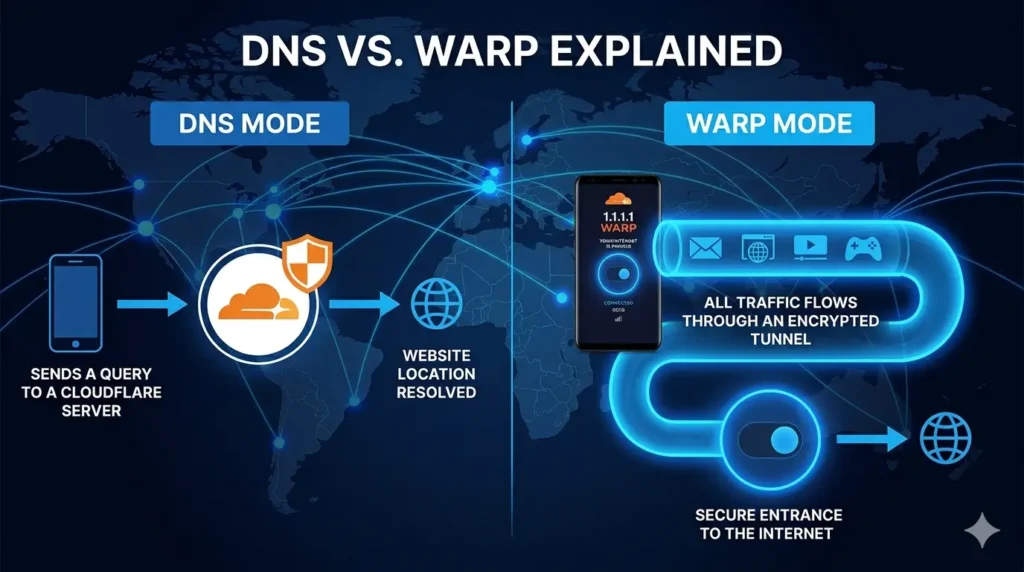
The first technology is the 1.1.1.1 DNS resolver. DNS stands for Domain Name System and it acts like a phone directory for the internet. Every time you open a website, your phone sends a DNS query to look up that website’s address. By default, your ISP handles these queries, which means it can see every website you visit. The 1.1.1.1 resolver handles those queries instead and does it faster and more privately than any ISP can.
The second technology is WARP. WARP goes beyond DNS and encrypts all traffic leaving your device. It creates a secure tunnel between your phone and the internet using the modern WireGuard protocol. This stops ISPs, hackers on public WiFi, and network observers from seeing what you do online.
Together, these two technologies make the 1.1.1.1 WARP APK download one of the smartest free privacy apps you can install on Android today.
1.1.1.1 WARP APK App Info
| Detail | Info |
|---|---|
| App Name | 1.1.1.1 + WARP: Safer Internet |
| Developer | Cloudflare Inc. |
| Official Website | https://one.one.one.one |
| Play Store URL | https://play.google.com/store/apps/details?id=com.cloudflare.onedotonedotonedotone |
| Total Downloads | 50 Million+ on Google Play |
| Monthly Downloads | 4 Million (Pakistan + Global) |
| Android Required | Android 7.0 and above |
| App Size | 14 MB |
| Root Required | No |
| Account Required | No |
| Latest Version | 6.38.7 |
| Price | Free (WARP+ paid upgrade available) |
| Encryption | WireGuard + MASQUE Protocol |
How Is 1.1.1.1 WARP Different from a Regular VPN?
Before going into features, it helps to understand what makes this app different from popular VPN apps like Turbo VPN or Psiphon Pro. Most people call it a VPN but it actually works differently and serves a different purpose.
A traditional VPN like Turbo VPN routes your traffic through servers in other countries so you appear to be browsing from a different location. This lets you bypass geo-blocks and access content restricted in your region.
The 1.1.1.1 WARP app does not change your location. Instead, it focuses on making your existing internet connection faster and more private. WARP encrypts your traffic and routes it through Cloudflare’s global network without assigning you a foreign IP address.
Think of it this way. A regular VPN is like disguising yourself before entering a building. WARP is like having a private bodyguard escort you everywhere you go without changing who you are.
This makes WARP the better choice for users who want privacy and speed without needing to access geo-restricted content from other countries. If you want to unblock region-locked content, a traditional VPN remains the better pick. Both tools complement each other well, which is why having both on your phone makes sense.
Key Features of 1.1.1.1 WARP APK for Android
World’s Fastest DNS Resolver
Cloudflare built 1.1.1.1 with one goal in mind: to make DNS resolution faster than anything else available. Independent testing by dnsperf.com consistently ranks 1.1.1.1 as the fastest public DNS resolver in the world. When you switch to it, every website you visit loads noticeably quicker because your DNS queries get answered in milliseconds instead of the slow response times typical ISP DNS servers deliver.
Full Traffic Encryption with WireGuard
WARP uses the WireGuard protocol to encrypt all internet traffic leaving your Android device. WireGuard is the newest and fastest encryption protocol available today. It outperforms older protocols like OpenVPN and IPSec in both speed and security. When WARP runs on your phone, your ISP sees encrypted data instead of your actual browsing activity.
MASQUE Protocol Support
Cloudflare upgraded WARP to support the MASQUE protocol as its default tunneling method. MASQUE runs over HTTP/3 and QUIC which makes it harder to detect and block compared to traditional VPN protocols. The app also includes a TCP fallback for networks that block UDP or HTTP/3 so you stay connected even on restrictive networks.
Blocks Malware and Phishing
The 1.1.1.1 WARP app actively protects your phone from security threats. It blocks malware websites, phishing pages, and crypto-mining scripts before they ever load on your device. This protection runs at the DNS level which means dangerous websites get blocked before your browser even tries to connect to them.
1.1.1.1 for Families: Built-in Content Filtering
The app includes a special mode called 1.1.1.1 for Families. When you enable this mode, the app blocks websites containing malware and also filters out adult content. This makes it an excellent choice for parents who want to add a basic layer of content protection on their children’s Android devices without installing separate parental control software.
One-Tap Connect
The 1.1.1.1 app keeps things simple. You open it, tap the toggle button, and your connection instantly becomes private and encrypted. You do not need to select a server, choose a location, or configure any settings. The app handles everything automatically in the background.
Trusted Networks Feature
The app includes a Trusted Networks feature that lets you set specific WiFi networks as trusted. When you connect to a trusted network like your home WiFi, the app can automatically adjust its behavior. This gives you more control over when WARP activates and how it behaves on different networks.
Zero Data Selling Policy
Cloudflare built its reputation on privacy. The company does not sell user data to advertisers or third parties. The 1.1.1.1 app operates under a strict privacy policy that limits what data Cloudflare collects and how long it retains it. This level of transparency is rare among free privacy apps.
Available on All Platforms
The same Cloudflare account works across Android, iOS, Windows, macOS and Linux. You get consistent privacy protection across every device you own without paying separate subscriptions for each platform.
Lightweight App Size
The 1.1.1.1 WARP APK file weighs in at approximately 14 MB. This makes it one of the lightest privacy apps available for Android. It runs quietly in the background without draining your battery or consuming significant RAM.
1.1.1.1 WARP vs Turbo VPN vs Psiphon Pro: Full Comparison
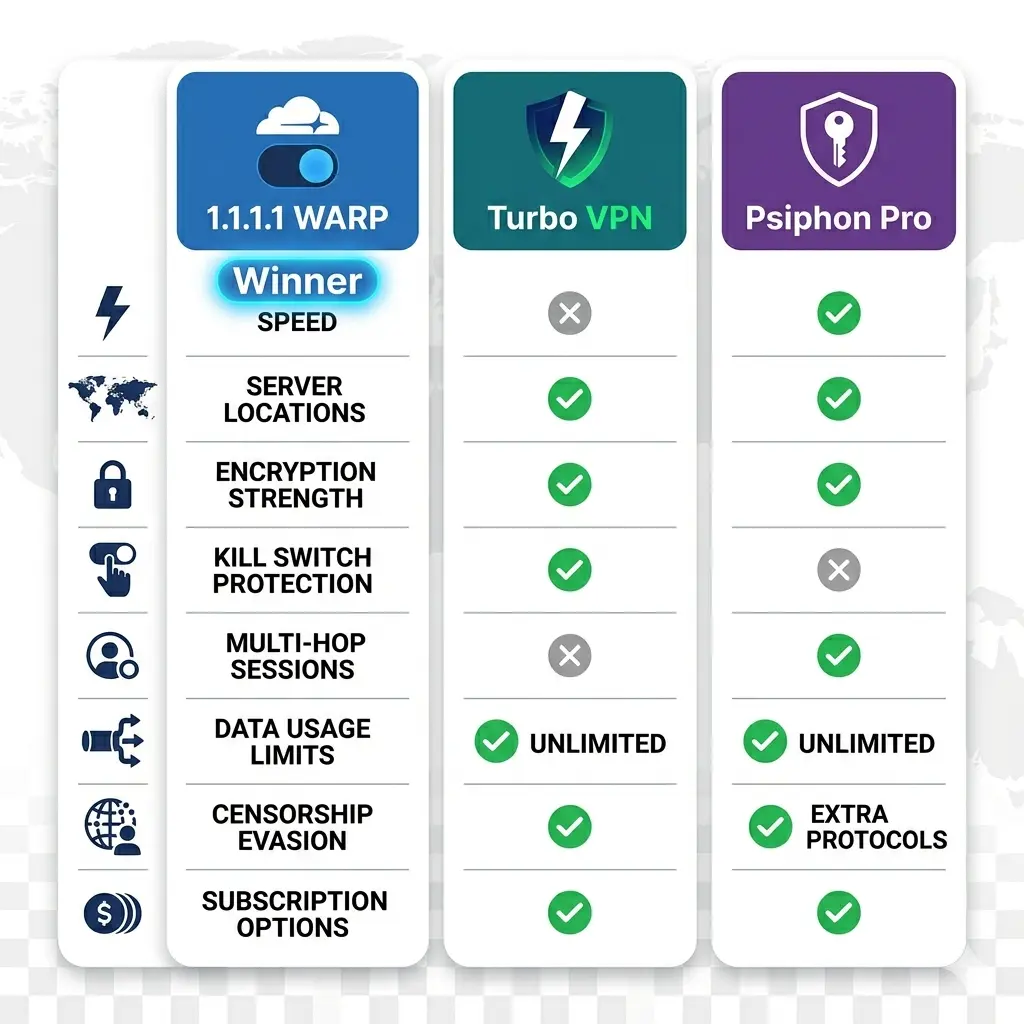
All three apps live in the VPN and privacy space but they serve very different purposes. Here is a detailed comparison so you know exactly when to use each one.
| Feature | 1.1.1.1 WARP | Turbo VPN | Psiphon Pro |
|---|---|---|---|
| Primary Purpose | DNS + Privacy | VPN Proxy | Anti-Censorship |
| Changes Your IP Location | No | Yes | Yes |
| Bypasses Geo-Blocks | Partial | Yes | Yes |
| Encryption Protocol | WireGuard/MASQUE | AES-256 | Multi-Protocol |
| Connection Speed | Fastest | Very Fast | Moderate |
| App Size | 14 MB | 25 MB | 20 MB |
| Server Selection | No | 111 Countries | Limited |
| Malware Blocking | Yes | No | No |
| Open Source | Partial | No | Yes |
| No Logs Policy | Yes | Yes | Yes |
| Free Version | Yes | Yes | Yes |
| Ads in Free Version | No | Yes | Yes |
| Developer | Cloudflare Inc. | Innovative Connecting | Psiphon Inc. |
| Pakistan Downloads (Monthly) | 4M | High | High |
| Best For | Speed and privacy | Unblocking sites | Censorship bypass |
Is 1.1.1.1 WARP Safe to Use on Android?
Yes, the 1.1.1.1 WARP app is one of the safest free privacy tools you can use on Android. Cloudflare is a publicly traded American company with a strong reputation in internet security and privacy. Unlike many free VPN providers, Cloudflare does not monetise user data and publishes annual transparency reports that detail any government requests it receives.
The WireGuard protocol the app uses is open source and independently audited. Security researchers worldwide review its code, which makes it one of the most trusted encryption protocols available today.
There are a few things worth understanding about how it handles privacy. Cloudflare does store limited connection metadata for a short period for operational purposes. However, it does not store browsing history, DNS query logs beyond 25 hours, or personal information. For most users in Pakistan, this level of privacy is more than sufficient for everyday internet use.
Here are a few practical tips to get the most security from the app:
- Enable the WARP mode rather than the DNS-only mode for full traffic encryption
- Turn on 1.1.1.1 for Families mode if you share the device with children
- Use WARP alongside a private browser like Firefox Focus for maximum privacy
- Avoid assuming WARP makes you completely anonymous, since your accounts and cookies still identify you on websites
For privacy-conscious Android users in Pakistan, 1.1.1.1 WARP is one of the most trustworthy free options available.
What Is WARP Plus and Is It Worth It?
The free version of WARP gives you encrypted traffic and faster DNS. WARP Plus is a paid upgrade that adds access to Cloudflare’s Argo network, a private backbone that routes your traffic through less congested internet pathways.
WARP Plus reduces latency by up to 30 per cent on long-distance connections, according to Cloudflare’s own testing. This makes a noticeable difference for gamers, remote workers connecting to international servers, and users who stream from overseas platforms.
| Feature | WARP Free | WARP Plus |
|---|---|---|
| Price | Free | $4.99/month |
| DNS Encryption | Yes | Yes |
| Traffic Encryption | Yes | Yes |
| Argo Smart Routing | No | Yes |
| Reduced Latency | Standard | Up to 30% faster |
| Data Limit | Unlimited | Unlimited |
| Malware Blocking | Yes | Yes |
| Best For | Daily privacy | Gaming, streaming |
For most everyday users, the free WARP version delivers everything they need. WARP Plus makes sense for users who notice high latency on international connections and want the fastest possible speeds.
How to Download 1.1.1.1 WARP APK Free for Android?
You have two methods to get the 1.1.1.1 WARP APK on your Android device.
Method 1: Google Play Store (Recommended)
This is the simplest and safest method. Open the Play Store on your Android phone, search for “1.1.1.1 WARP” or “Cloudflare WARP,” and tap Install. The app downloads and installs automatically and you get future updates without doing anything manually.
Method 2: Direct APK Download
If you prefer to download the APK file manually, follow these steps:
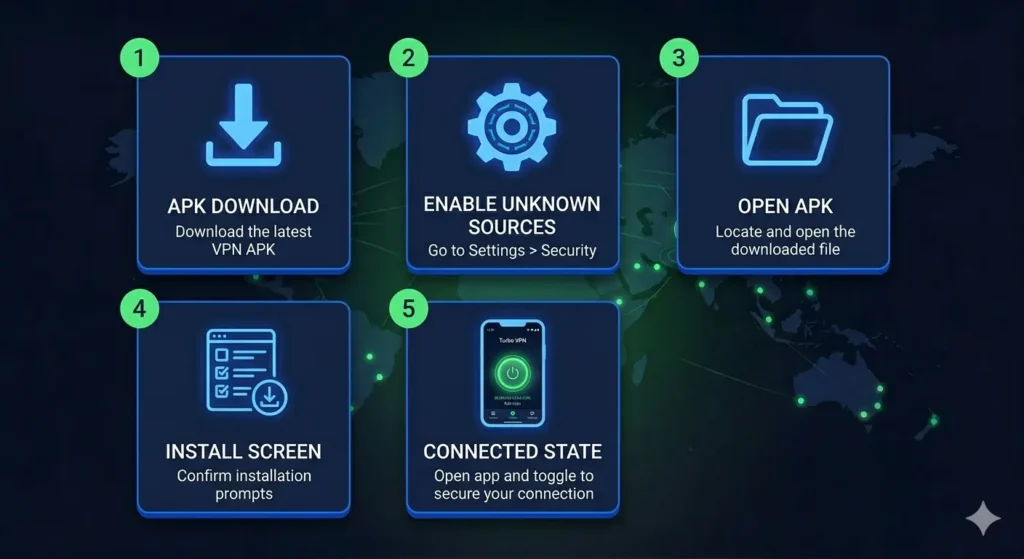
- Open your browser and go to apkstick.pk
- Search for 1.1.1.1 WARP APK in the search bar
- Open the app page and tap the Download button
- Wait for the APK file to finish saving to your phone
- Go to Settings on your Android device
- Open Security or Privacy, depending on your phone model
- Enable the Install from Unknown Sources option
- Open your file manager and go to the Downloads folder
- Tap the 1.1.1.1 WARP APK file to begin installation
How to Install 1.1.1.1 WARP APK on Android Step by Step?
After downloading the APK file, follow these steps to complete the installation.
Step 1: Open your file manager and navigate to the Downloads folder. Find the file named something like 1.1.1.1-WARP.apk.
Step 2: Tap the file. Your phone will display an installation confirmation screen.
Step 3: If your phone asks for permission to install from unknown sources, go to Settings, enable that permission, and return to the file.
Step 4: Tap the Install button and wait for the installation bar to complete. This takes about 10 to 15 seconds.
Step 5: Tap Open once installation finishes. The app launches directly.
Step 6: You will see a simple interface with a toggle button in the centre. Tap the toggle to enable WARP. The app connects in two to three seconds. You will notice the toggle turns blue when active.
Your phone now routes all DNS traffic through Cloudflare’s 1.1.1.1 resolver and encrypts all outgoing internet traffic through WARP.
How to Set Up 1.1.1.1 WARP for Maximum Privacy?
Setting up the app for the best privacy experience takes less than two minutes.
Step 1: Enable WARP mode. Open the app and tap the toggle to connect. By default, the app connects in WARP mode, which encrypts all traffic. Make sure you see “WARP” displayed at the top of the screen rather than “1.1.1.1” which would indicate DNS-only mode.
Step 2: Enable 1.1.1.1 for Families (optional). Tap the three-line menu icon at the top right of the screen. Go to Advanced, then DNS, and switch to 1.1.1.1 for Families. This activates malware blocking and adult content filtering.
Step 3: Configure Trusted Networks (optional). Go to the app settings and find the Trusted Networks option. Add your home WiFi network as a trusted network if you want WARP to behave differently when you are on a network you already trust.
Step 4: Enable Split Tunnel (optional). In the app settings you can configure which apps use WARP and which apps use your regular connection. This is useful if you want certain apps, like banking or local streaming services to bypass WARP entirely.
How to Use 1.1.1.1 WARP to Speed Up Your Internet in Pakistan?
One of the most practical benefits of this app for Pakistani users is noticeably faster browsing. Here is exactly how it helps:
Pakistani ISPs typically use slow or poorly maintained DNS servers that add unnecessary delay to every webpage you visit. Switching to Cloudflare’s 1.1.1.1 resolver alone can reduce that delay significantly because 1.1.1.1 answers DNS queries faster than any other public resolver available today.
Additionally, WARP routes your traffic through Cloudflare’s global network, which has data centres in Pakistan, India, Singapore and dozens of nearby countries. This smart routing often finds a faster path to international websites than your ISP’s default routing would take.
The practical result for Pakistan users is that international websites load faster, streaming buffers less, and general browsing feels more responsive, all without paying anything.
System Requirements for 1.1.1.1 WARP APK
| Requirement | Details |
|---|---|
| Android Version | 7.0 and above |
| App Size | 14 MB |
| Internet Connection | Required |
| Root Access | Not required |
| Account Required | No (optional for WARP+) |
| Storage Space | 30 MB free minimum |
| RAM | 1 GB minimum recommended |
| Battery Impact | Minimal |
1.1.1.1 WARP Free vs WARP Plus: Which One Should You Choose?
For most Android users in Pakistan, the free version of 1.1.1.1 WARP delivers everything they need. It encrypts your traffic, speeds up DNS, blocks malware, and runs with zero ads and no account required.
WARP Plus makes a real difference if you game online, stream from international platforms regularly, or do remote work that involves connecting to servers abroad. The Argo smart routing reduces latency on long-distance connections by up to 30 percent which is a meaningful improvement for those use cases.
Start with the free version. If you notice high latency specifically on international connections, consider trying WARP Plus for a month to see if the improvement justifies the cost for you.
Why 1.1.1.1 WARP APK Stands Out Among Free Privacy Apps for Android
Most free privacy apps come with a catch. They show ads, sell your data, limit your bandwidth, or push you toward a paid plan at every opportunity. The 1.1.1.1 WARP app breaks that pattern entirely.
Cloudflare offers this app for free because it benefits their business indirectly. More people using their DNS resolver strengthens Cloudflare’s network data and improves the services they sell to businesses. This business model means you get a genuinely free, genuinely private app without being the product yourself.
Add to this the fact that Cloudflare is one of the most reputable internet companies in the world, that the WireGuard protocol the app uses is independently audited, and that the app installs in under a minute with no account required. The result is one of the best free privacy apps for Android that you can download today with complete confidence.
Conclusion
The 1.1.1.1 WARP APK gives Android users in Pakistan and around the world something genuinely valuable: faster internet and stronger privacy at absolutely no cost. It replaces your ISP’s slow DNS with the world’s fastest resolver, encrypts all your traffic with WireGuard, blocks malware and phishing sites automatically, and does all of this without showing a single ad or asking for your personal information.
Unlike traditional VPN apps that focus on changing your location, this app focuses on making your existing connection more private and more reliable. It does that job better than any free alternative available today. The 14 MB app size means it takes up almost no space, and the one-tap interface means anyone can use it immediately without any technical knowledge.
If you want faster browsing, stronger privacy, and malware protection on your Android phone without spending money, downloading the 1.1.1.1 WARP APK right now is the smartest move you can make.
FAQs
It does two things. First, it replaces your ISP’s DNS server with Cloudflare’s faster and more private resolver so every website you visit loads quicker. Second it encrypts all internet traffic leaving your phone through a secure tunnel so your ISP and network observers cannot see what you browse.
The app is completely free to download and use. The free version includes DNS encryption, full traffic encryption through WARP, malware blocking, and the 1.1.1.1 for Families content filter. A paid upgrade called WARP Plus is available for users who want even faster speeds through Cloudflare’s premium Argo network.
No. This app encrypts your traffic and speeds up your DNS but it does not assign you an IP address from another country. If you want to appear as if you are browsing from a different country to access geo-blocked content, you need a traditional VPN app instead.
Most VPN apps focus on giving you a foreign IP address to bypass geo-restrictions. This app focuses on making your existing connection faster and more private using WireGuard encryption and the world’s fastest DNS resolver. It also adds malware blocking, which most VPN apps do not include.
Yes, it works in Pakistan. Pakistani users benefit from faster DNS responses because Cloudflare operates data centers in Pakistan and nearby countries. The app also helps bypass DNS-based blocks that ISPs apply to certain websites.
No. The 1.1.1.1 WARP app is specifically designed to be lightweight and efficient. Cloudflare built WARP using WireGuard which is far less resource-intensive than older VPN protocols. Most users report no noticeable difference in battery life when the app runs in the background.
For banking and sensitive financial tasks, the app adds a meaningful layer of encryption that protects your data from network observers. However, for maximum security on sensitive transactions, it is always best practice to use apps from trusted sources and avoid public WiFi regardless of which privacy tool you use.

APKStick Team
The APKStick Team consists of dedicated Android gaming enthusiasts based in Pakistan who personally test, install, and review every APK before publishing. With years of hands-on experience in mobile gaming and earning apps, we aim to provide safe, verified, and up-to-date APK downloads for Pakistani users. Every app reviewed on APKStick is manually tested on real Android devices to ensure it works, pays, and is free from malware.
Download links
Click the above button to download the game.
Download your game by clicking the button below.