Description
Spam calls in Pakistan have become a daily headache. Bank loan offers, fake prize announcements, telemarketing pitches, and outright scam calls interrupt your day dozens of times a week. If you want to know how to block spam calls in Pakistan using Truecaller, this guide walks you through every feature, every setting, and every step so you can take back full control of your phone.
What is Truecaller?
Truecaller is a caller ID and spam blocking app used by hundreds of millions of people worldwide. It identifies unknown numbers before you even pick up the call, automatically blocks known spam numbers, filters spam SMS, records calls, and even uses AI to detect scam voices in real time. For Pakistani users dealing with constant telemarketing and fraud calls, Truecaller is one of the most effective tools available on Android.
The app works by maintaining a massive community-powered database of spam numbers. Every time a user reports a number as spam, that number gets added to the global block list. With millions of users reporting spam numbers daily, the database updates in real time and catches new spam numbers almost immediately after they start calling people.
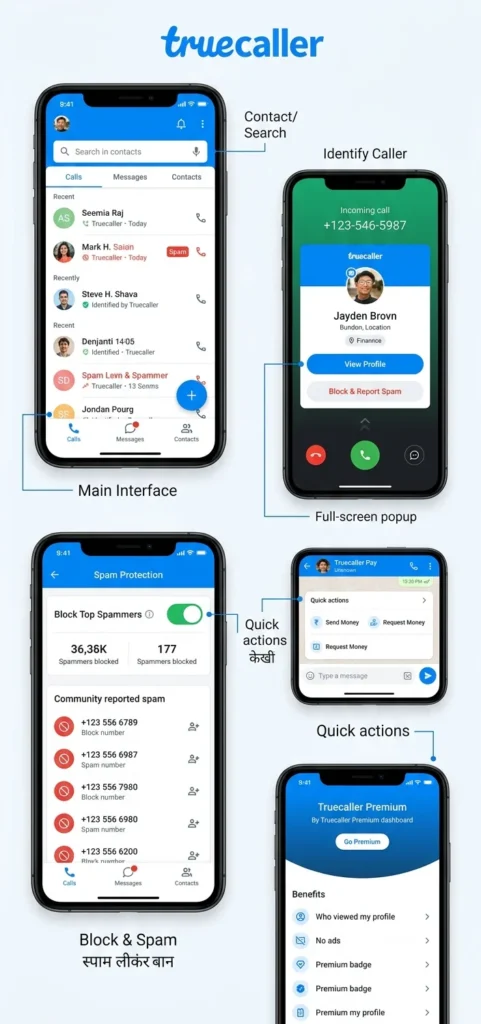
Why Spam Calls Are So Common in Pakistan
Pakistan receives over 15 million spam calls every month, according to telecom reports. Mobile networks like Jazz, Zong, and Telenor allow companies to send bulk marketing calls and SMS because it generates revenue for them. This means your network provider has no strong reason to block these calls on your behalf.
Scam calls have also increased significantly. Fraudsters pretend to be bank representatives, prize draw organisers, government officials, and delivery agents to trick people into sharing personal or financial information. Many of these calls come from numbers that look local but are actually operated by automated robocall systems.
Truecaller solves this problem by identifying these numbers before your phone even rings properly, giving you the information you need to decide whether to answer or ignore the call.
How to Download and Set Up Truecaller in Pakistan?
Setting up Truecaller takes less than five minutes. Follow these steps exactly and you will have full spam protection running on your phone immediately.
Download Truecaller
Download the Truecaller APK from APKStick or install it directly from the Google Play Store. The app is completely free to download and use. A premium subscription exists but the free version covers all the essential spam blocking features you need.
Register Your Number
Open Truecaller after installation. Enter your phone number, Jazz, Zong, Telenor, or Ufone, all work fine. Truecaller sends a verification OTP to your number. Enter the OTP to complete registration. Add your name and, optionally a profile photo to finish setting up your account.
Grant Required Permissions
Truecaller will ask for permission to access your phone calls, contacts, and SMS. Grant all of these. Without these permissions, the caller ID and spam blocking features cannot work. Truecaller needs phone access to identify incoming calls, contacts access to cross-reference your saved numbers, and SMS access to filter spam text messages.
Set Truecaller as Your Default Dialer
Truecaller will ask if you want to set it as your default calling app. Tap Yes. This is important because Truecaller can only show caller ID information and block calls in real time if it is your default dialer. Without this step, it cannot intercept incoming calls before they reach you.
Enable Spam Protection
Once inside the app, tap the Shield icon or go to Settings > Block. Make sure spam protection is turned on. You will see options to block telemarketing calls, robocalls, unknown numbers, and numbers from specific countries. Enable the ones that match the type of spam you receive most.
How to Block Spam Calls in Pakistan Using Truecaller?
Key Features Explained
Automatic Spam Detection
This is Truecaller’s most powerful feature. The moment a spam call comes in, Truecaller identifies it and either shows a red spam warning on your screen or blocks it entirely before it rings. You do not have to do anything; the app handles it automatically using its real-time community database.
The spam database updates constantly as millions of users worldwide report new numbers. This means even brand-new spam numbers that just started calling today get flagged and blocked very quickly across all Truecaller users.
Caller ID for Unknown Numbers
Even when a call is not spam, Truecaller shows you the name and identity of the caller if that number exists anywhere in its database. This is extremely useful in Pakistan, where people often call from numbers you have not saved. A delivery rider, a new contact, a business — Truecaller identifies them all and shows their name on your screen before you answer.
You can also use Truecaller’s reverse number lookup feature. If you missed a call from an unknown number, open Truecaller and search that number. You will instantly see the name associated with it if it exists in the database.
Block Specific Numbers Manually
If a specific number keeps calling you and Truecaller has not automatically blocked it yet, you can block it manually in seconds.
Open Truecaller and tap the Dial pad. Enter the number and tap the three-dot menu, then select Block. Alternatively, after receiving a call from that number, tap on the call log entry, tap Block and Report Spam, and choose the type of spam: telemarketing, fraud, or robocall. This also reports the number to the global Truecaller database, helping protect other users in Pakistan from the same number.
Block Unknown and International Numbers
Go to Settings > Block inside Truecaller. You will find options to automatically block calls from numbers not in your contacts, numbers with no caller ID, and calls from specific country codes. If you keep receiving scam calls from international numbers, enabling the country code block option stops all of them instantly.
This feature is particularly useful for Pakistani users who receive constant calls from unknown international numbers claiming to be from foreign companies, prize organisations, or fake government agencies.
Spam SMS Filter
Truecaller also protects you from spam text messages. Set Truecaller as your default SMS app from Settings > Default Apps on your phone, then open Truecaller and go to Messages. The app automatically organises your SMS inbox into four tabs Personal, Important, Other, and Spam. All marketing messages, OTP phishing attempts, and promotional SMS get sorted into the Spam tab automatically so they never clutter your main inbox.
You can also manually mark senders as spam from within the Messages tab. Once marked, all future messages from that sender go directly to Spam without any notification.
Truecaller Assistant — AI Call Screening
Truecaller’s Assistant feature is available in the premium version and acts as an AI-powered gatekeeper for your calls. When an unknown number calls, the Assistant answers on your behalf, asks the caller why they are calling, and transcribes the conversation for you in real time. It identifies spam and robocalls with over 90 percent accuracy. You see the transcription on your screen and decide whether to pick up the call or let it go.
This is especially useful for Pakistani users who receive calls from fake bank representatives or prize draw scammers. The AI can identify these patterns and flag them before you ever have to speak to the caller.
AI Voice Scanner
Truecaller includes a new AI Call Scanner feature that detects whether the voice on a call is a real human or an AI-synthesised voice. Voice scam calls, where fraudsters use AI to clone a familiar voice, are growing globally. The AI Call Scanner analyses the caller’s voice in real time and alerts you if it detects a synthetic or cloned voice. Activate it from the dialer during a call using the dedicated scanner button.
Family Protection
Truecaller’s Family Protection feature lets you manage spam blocking for your family members remotely. This is particularly useful for parents in Pakistan who want to protect elderly parents or younger siblings from scam and fraud calls. You can remotely end suspicious calls, get real-time scam call alerts for family members, and manage their block lists from your own Truecaller account.
How to Use PTA DND Service Alongside Truecaller?
Truecaller handles spam calls and SMS from unknown numbers extremely well. But for registered telemarketing companies operating through Pakistani networks, the PTA also offers a free Do Not Disturb service.
To register for PTA DND, open your SMS app and send “reg” to 3627. You will receive a confirmation reply within a few minutes. This registers your number on the PTA’s Do Not Call list and legally requires marketing companies to stop calling you. It usually takes one to two days to take full effect.
Using both Truecaller and the PTA DND service together gives you the most complete protection against spam calls and SMS in Pakistan.
Truecaller Privacy — What You Should Know?
Truecaller is transparent about its data practices, but it is worth understanding what the app collects. When you register, Truecaller identifies your phone number and name. The app uses your call logs and contact information to improve its caller ID database, but it does not make your personal contacts publicly searchable.
If you want your own number removed from the Truecaller database so others cannot look it up, go to truecaller.com and submit your number for removal. Your number gets removed from search results within 24 hours.
Truecaller holds ISO certifications for Information Security and Data Quality, which means its data handling practices meet international standards. For a free app, it offers a reasonable level of privacy control compared to most alternatives.
Truecaller Free vs Premium — What Do You Actually Need?
Most Pakistani users do not need Truecaller Premium. The free version already covers all the essential features caller ID, automatic spam blocking, manual number blocking, spam SMS filter, and reverse number lookup.
Truecaller Premium adds call recording, the AI Assistant for call screening, incognito mode so others cannot see when you viewed their profile, no ads, and a premium badge on your profile. If you receive extremely high volumes of unknown calls and want AI-powered screening, Premium is worth considering. Otherwise, the free version handles everything you need for daily spam protection.
Truecaller vs Android’s Built-in Call Blocking
Most Android phones in Pakistan have a basic built-in call blocking feature. You can block individual numbers manually from the call log. However, the built-in feature does not identify unknown callers, does not have a community spam database, and cannot automatically detect new spam numbers.
Truecaller does all of this automatically and in real time. For anyone dealing with regular spam calls in Pakistan, Truecaller provides significantly better protection than the built-in Android call blocker alone.
Quick Setup Checklist — Block Spam Calls in Pakistan Using Truecaller
Use this checklist to make sure you have set up Truecaller correctly for maximum protection:
- Truecaller is installed and registered with your Pakistani number
- Set as the default dialer app
- Spam protection turned on in Settings > Block
- Country-based blocking is enabled for international spam numbers
- Truecaller is set as the default SMS app for spam message filtering
- PTA DND registered by sending “reg” to 3627
- Known spam numbers are manually reported to help other Pakistani users
Conclusion
Spam calls in Pakistan are not going away on their own. But with the right setup, you can stop almost all of them from ever reaching you. Truecaller gives you real-time caller identification, automatic spam blocking, AI-powered call screening, and spam SMS filtering all in one free app. Combine it with the PTA DND service, and you have the strongest possible protection against unwanted calls and messages on your Android phone in Pakistan.
Download the Truecaller APK from APKStick, follow the setup steps above, and you will notice the difference from the very first day.
Frequently Asked Questions (FAQs)
Yes. Truecaller is completely free to download and use. The free version includes caller ID, automatic spam blocking, manual number blocking, and spam SMS filtering. A premium subscription adds call recording, AI call screening, and no ads.
Yes. Truecaller works on Jazz, Zong, Telenor, Ufone, and any other SIM network in Pakistan. Your network provider does not affect how Truecaller identifies or blocks calls.
Truecaller identifies and blocks spam on regular phone calls and SMS. For WhatsApp calls, you need to use WhatsApp’s own block feature. Open the chat, tap the contact name, scroll down, and tap Block
The PTA Do Not Disturb service registers your number on Pakistan’s official Do Not Call list. Send “reg” to 3627 from your Pakistani number. Marketing companies registered with PTA are legally required to stop calling you after registration.
Yes. Go to Settings > Block inside Truecaller and enable country-based blocking. You can block all calls coming from specific country codes, which stops international spam and scam calls completely.

APKStick Team
The APKStick Team consists of dedicated Android gaming enthusiasts based in Pakistan who personally test, install, and review every APK before publishing. With years of hands-on experience in mobile gaming and earning apps, we aim to provide safe, verified, and up-to-date APK downloads for Pakistani users. Every app reviewed on APKStick is manually tested on real Android devices to ensure it works, pays, and is free from malware.
Download links
Click the above button to download the game.
Download your game by clicking the button below.